
Matching
You hold the candidate. The AI finds the jobs.
Matching reverses the job board: one candidate goes in, a ranked shortlist of fitting jobs comes out. Every match carries a fit score from 0 to 100 and a plain-language explanation of why it fits.
From one candidate to a shortlist of jobs
Six steps, and you stay in control of every one of them.
Start from a candidate
Matching begins with one person in a project: their CV, your notes, any extra files. talentkiwi reads everything automatically, including scanned PDFs via OCR, and builds one profile the AI understands.
Define what you are looking for
Pick the sources to search, describe the role in your own words (typed or dictated), and set smart filters for salary, workload, languages or location. The AI proposes a sensible starting set; you adjust freely.
See the plan before it runs
The search strategy preview explains in plain language how the AI understood your request and which filters it will apply. A live counter shows how many jobs currently match, so you widen or narrow the search before spending the run.
The AI does the matching
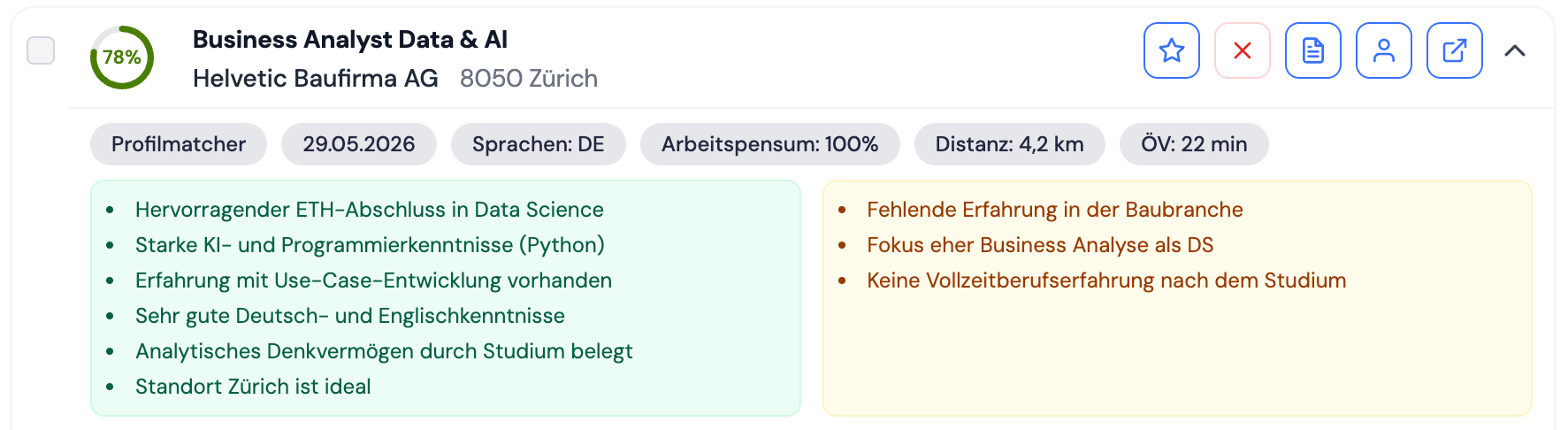
The engine reads for meaning first, so it finds relevant roles even when the wording differs from the CV, then sharpens the result with precise keyword matching and re-ranks by genuine relevance. Every job receives a score from 0 to 100 and a short written explanation.
Review ranked results
Each job arrives as a card: color-coded fit score, commute time, workload, languages and posting date, plus the reasoning in two panels, why it fits well and where gaps remain. The full description and the original posting are one click away.
Act on matches
Shortlist or reject, create a document project for candidate and job in one click, or copy the direct contact for the role. Bulk actions and drafted emails cover the rest: present jobs to your candidate, or your candidate to a client.
The details that matter in daily recruiting
Six capabilities that separate matching from a keyword search.
Fit scores you can trust
Every match carries a score from 0 to 100 and a written justification, strengths and gaps spelled out. Reasoning, not a black box.
Travel-time intelligence
Search by place and radius, by region, or by real travel time, for example within 30 minutes by car or public transport. Commute time is calculated for every job.
Sort and filter, instantly
Re-rank by best match, newest, distance or match date. Set a minimum quality threshold, hide agency listings or filter by commute time, all after the search and without a new run.
Always-on alerts
Turn any search into a standing alert that emails you new matching jobs: as a morning digest, hourly or weekly. Stale alerts pause themselves so your inbox stays clean.
Additive refresh
Re-run a search anytime and pull in only the genuinely new postings. Reviewed and shortlisted jobs stay untouched; new finds are flagged.
Built-in outreach
Go from a match to a drafted client or candidate email without leaving the tool.
See matching on your own candidates
And when a job fits, talentkiwi creates the dossier right there. One tool, one workflow.